
OP Registration
5Four counters are available for OP Registration
- Super Specialty Block –>Ground Floor –>Reception Counter
- Old OP Block –>Ground Floor –>OP Counter
- OP Counter –>Ground Floor –>Administrative office (Only for staff and Physiotherapy Patients)
- Cancer Block –> Reception counter –>Only for Oncology patients
Registration Time: 7.30 am – 01.00 pm (Two counter from 5.00 AM at OP Block)
Evening O.P (General O.P Only ) : 1.00 pm – 6.00 pm
Guidelines for OP Registration
- The patients need to take OP ticket from any of the OP reception counters. New patients needs to take new OP ticket from the OP counter
- The registration counter staff will enter the details provided by the patient which includes Mobile number, Patient Name, Age, Gender etc.
- A new OP ticket with a UHID number will be generated from eHealth software.
- The patient needs to pay Rs.5/- for new OP ticket
- The Revisit patients with OP ticket in hand needs to take visit date’s token number from the reception counter , seal and token number with date will be marked in the OP ticket.
- When the registration process is completed, the patient waits in front of the concerned OP room for his token number to be displayed on token display.
- For any corrections/updations in the Name, Age , Sex, Address etc in the OP/IP slip please visit Medical Records Department located in the first floor of Administrative Office.
Guidelines for Advance Booking
- After completing consultation it is now possible to take advance appointment from hospital for the next visit.
- Visit reception counter and show your OP ticket and tell them the next appointment date
- Depending upon the availability of token, advance OP token will be getting from reception counter
- Visit on the appointment taken date in the OP counter directly without waiting in the long queue.
Guidelines for Online Booking
- UHID number is Unique Hospital Identification Number and it can be temporary or permanent.
- Temporary UHID starts with ‘T’ and Permanent UHID shall begin with hospital code and not with ‘T’.
- For Permanent UHID registration Aadhaar card or Aadhaar number with aadhaar linked mobile is mandatory.
- It is possible to take permanent UHID number and UHID card from the hospital itself.
- One benefit of Permanent UHID card is patient can take online appointment directly from home itself.
Steps for taking online appointment
Open the website https://ehealth.kerala.gov.in
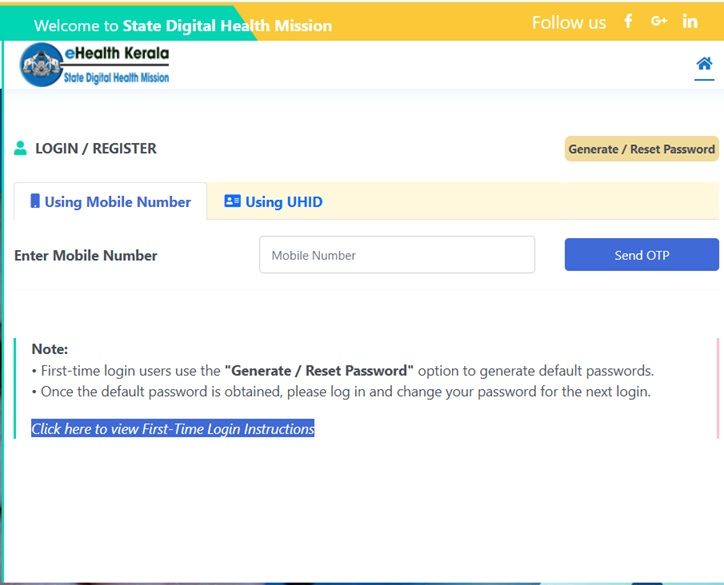
If you don’t have a permanent UHID you can follow the below given Steps for registering with eHealth. Click Register
- Type Mobile Number linked with Aadhaar Number
- You will get an OTP in the aadhaar linked Mobile,Type OTP and Captcha click verify.
- If you already have permanent UHID it will be list there
- Enter the year of birth and click proceed for booking appointment online.
- If you do not have permanent UHID a prompt will be displayed to enter Aadhaar number. Enter aadhar number and enter OTP after verifying details a message will be displayed with new UHID.
How to take online appointment?
- Login with your User name and Password or Mobile number
- Click on New Appointment and click Proceed
- Select the department from the Drop Down List and Click Proceed
- Select Date,give income and Click Check Availability
- While you select date available token will display in the screen.
- Select required token and Click Book Appointment,Pay digitally.
- After successful booking you will get an SMS with booking details to the registered mobile number.
Password policy
Create new password(must include one Uppercase letter (A,B,C…) , one digit (1,2,3…) and one special character (@,#,$….)
Print out of the OP ticket will be available from hospital.